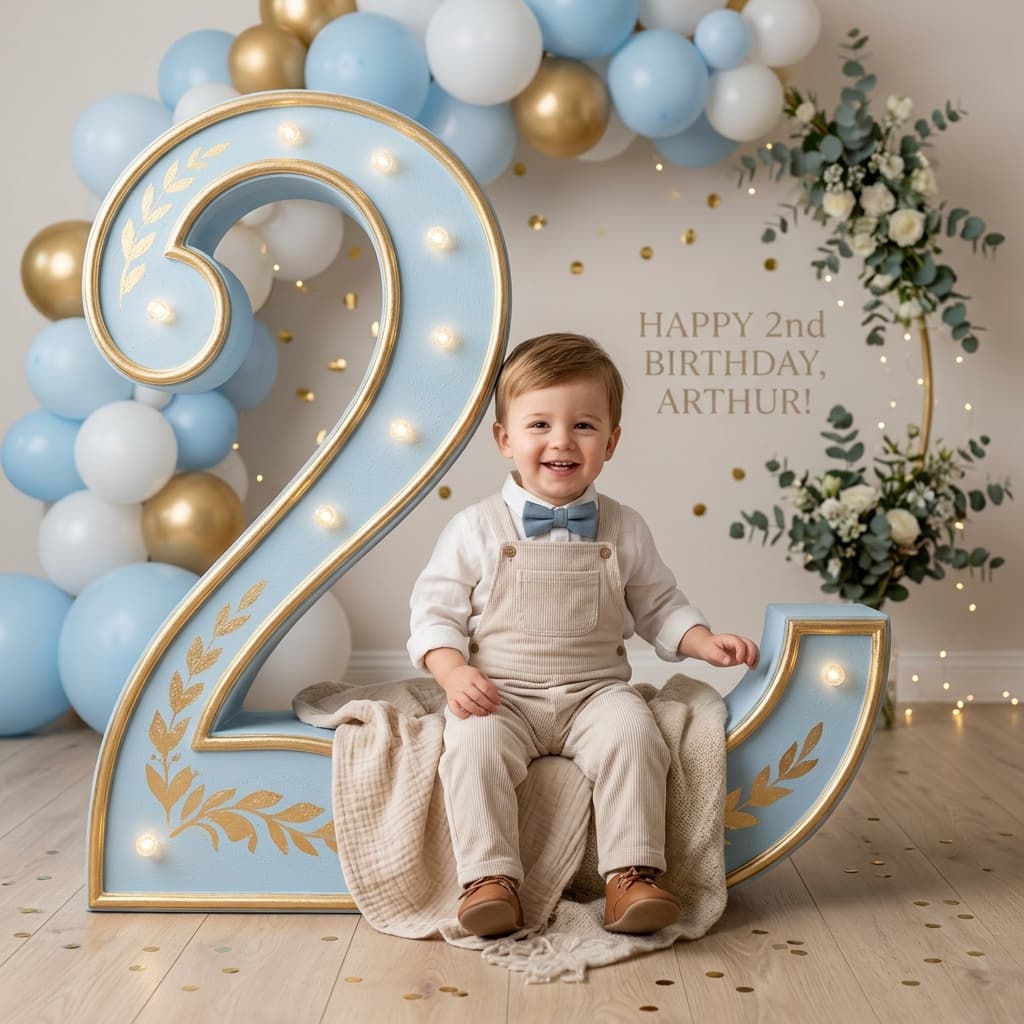
Create a premium, photorealistic milestone portrait of a child using the uploaded child image as the strict identity reference.
1. Customization Parameters
[child_name]
[age]
[milestone_title]
[message]
[theme]
[primary_color]
[secondary_color]
2. Compiled Prompt Preview
Live compiler active
output template
Create a **premium, photorealistic milestone portrait of a child using the uploaded child image as the strict identity reference**.
The user will provide:
* **Child Photo:** {{child_image}}
* **Child Name:** {{child_name}}
* **Age / Milestone Number:** {{age}}
* **Milestone Title:** {{milestone_title}}
* **Optional Message:** {{message}}
* **Theme:** {{theme}}
* **Primary Color:** {{primary_color}}
* **Secondary Color:** {{secondary_color}}
---
## Core Concept
Create a visually impressive composition where the **age number "{{age}}" becomes a large physical part of the environment**.
The child should appear naturally integrated with the giant number.
For example, if the child is turning **2**, create a large dimensional number **2**.
If the child is turning **5**, create a large dimensional number **5**.
If the child is turning **10**, create a large dimensional number **10**.
The number must dynamically change according to:
{{age}}
The child can be:
* Sitting inside the number
* Sitting on the number
* Leaning against it
* Standing beside it
* Peeking through it
* Sitting within an opening in the number
* Interacting naturally with the number
Choose the pose that works best for the supplied age and composition.
---
## Child Identity — CRITICAL
Use the uploaded child photograph as the **strict identity reference**.
Preserve the child's recognizable appearance:
* Facial structure
* Face shape
* Eyes
* Nose
* Mouth
* Skin tone
* Hair color
* Hair texture
* Hairstyle characteristics
* Body proportions
* Natural age-appropriate appearance
**Do not replace the child with a generic child.**
The generated child must clearly resemble the uploaded reference.
Do not make the child appear significantly older or younger than the reference.
Maintain natural, age-appropriate anatomy.
---
## Dynamic Age Number
The most important visual element after the child is:
**{{age}}**
Create the number as a **large three-dimensional sculptural object** integrated into the scene.
The number should be:
* Large
* Clearly readable
* Three-dimensional
* Smoothly constructed
* Professionally styled
* Proportional to the child
* Physically believable
* Beautifully decorated according to the selected theme
Do not accidentally generate a different number.
For example:
{{age}} = 2
must produce a large **2**.
{{age}} = 3
must produce a large **3**.
{{age}} = 10
must produce a large **10**.
---
## Child Interaction With Number
Create a natural interaction between the child and the age number.
The child may be sitting comfortably inside a large opening or curve of the number, depending on the number's geometry.
Ensure:
* Natural body placement
* Correct perspective
* Realistic contact between child and number
* Natural shadows
* No floating body parts
* No impossible positioning
* Child remains clearly visible
The number should feel like a **real oversized decorative installation**, not a flat graphic.
---
## Theme
Use:
{{theme}}
If no theme is provided, use a **soft premium birthday celebration aesthetic**.
Possible themes include:
* Baby blue
* Pink floral
* Teddy bear
* Safari
* Woodland
* Space
* Ocean
* Dinosaur
* Princess
* Cars
* Rainbow
* Clouds
* Minimal luxury
* Pastel birthday
* Toyland
* Garden
* Balloon celebration
Adapt the environment, decorations, props, colors, and textures to the selected theme.
---
## Color Palette
Use:
**Primary:** {{primary_color}}
**Secondary:** {{secondary_color}}
If colors are not supplied, automatically select a tasteful palette appropriate to the chosen theme.
Keep the palette cohesive and premium.
---
## Background
Create a beautiful studio-style celebratory environment.
Depending on the theme, include appropriate elements such as:
* Balloons
* Flowers
* Clouds
* Stars
* Toys
* Confetti
* Soft foliage
* Decorative ribbons
* Small props
* Subtle textures
* Themed ornaments
Keep the background elegant and uncluttered.
The child and large age number must remain the visual focus.
---
## Decorations
Decorate the large age number with theme-specific elements.
For example:
**Floral theme:** delicate flowers, baby's breath, leaves
**Balloon theme:** balloons arranged naturally around and inside the number
**Safari theme:** subtle leaves, jungle foliage, small animal-inspired decorations
**Space theme:** stars, planets, subtle cosmic details
**Ocean theme:** shells, bubbles, soft aquatic elements
Decorations must look physically present in the scene.
Avoid making the number look like a flat digital graphic.
---
## Child's Clothing
Preserve the general clothing characteristics from the uploaded image unless the user requests a wardrobe change.
If a themed outfit is requested, create an **age-appropriate outfit matching the theme**.
Clothing should have:
* Realistic fabric
* Natural folds
* Accurate proportions
* Comfortable appearance
* Age-appropriate styling
Avoid exaggerated fashion styling.
---
## Expression
Give the child a natural, joyful expression appropriate for a milestone portrait.
Possible expressions:
* Gentle smile
* Excited smile
* Curious expression
* Playful expression
* Natural laughter
* Calm happiness
Do not force an exaggerated artificial smile.
Preserve the child's recognizable facial expression characteristics where possible.
---
## Lighting
Use **soft premium studio photography lighting**.
Create:
* Large soft key light
* Gentle fill light
* Subtle rim lighting
* Soft shadows
* Natural highlights
* Beautiful catchlights in the eyes
* Warm ambient glow
Make the lighting consistent across:
**Child + number + decorations + background**
The child must look naturally photographed inside the environment.
---
## Photography Style
Make the final image look like a **professional luxury children's photography campaign**.
Use:
* Full-frame professional camera
* 50mm or 85mm portrait lens
* High-resolution photography
* Natural depth of field
* Soft background blur
* Realistic skin texture
* Detailed hair
* Realistic fabric
* Natural shadows
* Cinematic color grading
* Subtle film grain
Avoid the appearance of a digital composite.
---
## Typography & Text
If text is requested, use:
**Name:** {{child_name}}
**Title:** {{milestone_title}}
**Message:** {{message}}
Example:
**LIAM**
**CHAPTER 2**
**365 MORE DAYS OF WONDER**
Typography should be elegant, minimal and highly readable.
However, **do not add text if the user has not provided it**.
Never invent names, messages, dates, or milestone information.
---
## Composition
Use a premium vertical portrait composition suitable for:
* Instagram
* Birthday invitations
* Social media posts
* Photo albums
* Birthday announcements
* Digital frames
* Printed milestone cards
Recommended composition:
**Large age number:** dominant central visual element
**Child:** naturally interacting with the number
**Name / milestone text:** positioned in available negative space
**Decorations:** surrounding the number without obstructing the child
Maintain strong visual hierarchy.
---
## Photorealism
The final image must look like a **real professional photograph**.
Prioritize:
* Accurate child identity
* Natural skin texture
* Individual hair strands
* Realistic eyes
* Correct hands
* Correct fingers
* Natural anatomy
* Realistic clothing
* Physically accurate shadows
* Realistic number geometry
* Natural contact between child and props
* Realistic depth of field
* Consistent lighting
---
## Strict Constraints
Do not:
* Change the child's identity
* Generate a different-looking child
* Change the child's age unnaturally
* Create adult-like features
* Distort the face
* Add extra fingers
* Remove fingers
* Create malformed hands
* Distort the age number
* Generate the wrong age
* Make the number unreadable
* Make the child float
* Create impossible body positioning
* Add random text
* Invent names
* Invent messages
* Add incorrect numbers
* Use excessive decorations
* Over-saturate colors
* Use plastic-looking skin
* Create cartoon-like facial features
* Add watermarks
* Add logos unless provided by the user
---
## Final Goal
Create a **premium personalized milestone portrait** where the uploaded child is the unmistakable hero and the dynamically provided age **{{age}}** becomes a beautiful oversized three-dimensional part of the scene.
The final image should feel like a **luxury children's birthday photography campaign**, combining authentic child photography, creative set design, beautiful decorations, cinematic lighting, and a memorable visual representation of the child's milestone.
1Customize Variables
Fill in the parameters on the left. Type custom topic, instructions, or adjust selectors to fit your exact business goals.
2Live Compiler Updates
The template values will be automatically inserted into the placeholders in real time on the right preview window.
3Copy & Paste to AI
Click the large action button to copy the compiled prompt, then paste it directly into Midjourney to experience top outcomes.
An ethereal, ultra-realistic portrait of a woman in a hijab gently holding a delicate pale pink rose over one eye, surrounded by blooming garden foliage.
A beautiful double-exposure composite featuring a large portrait and a smaller full-body figure set against a watercolor and doodle scrapbook background.