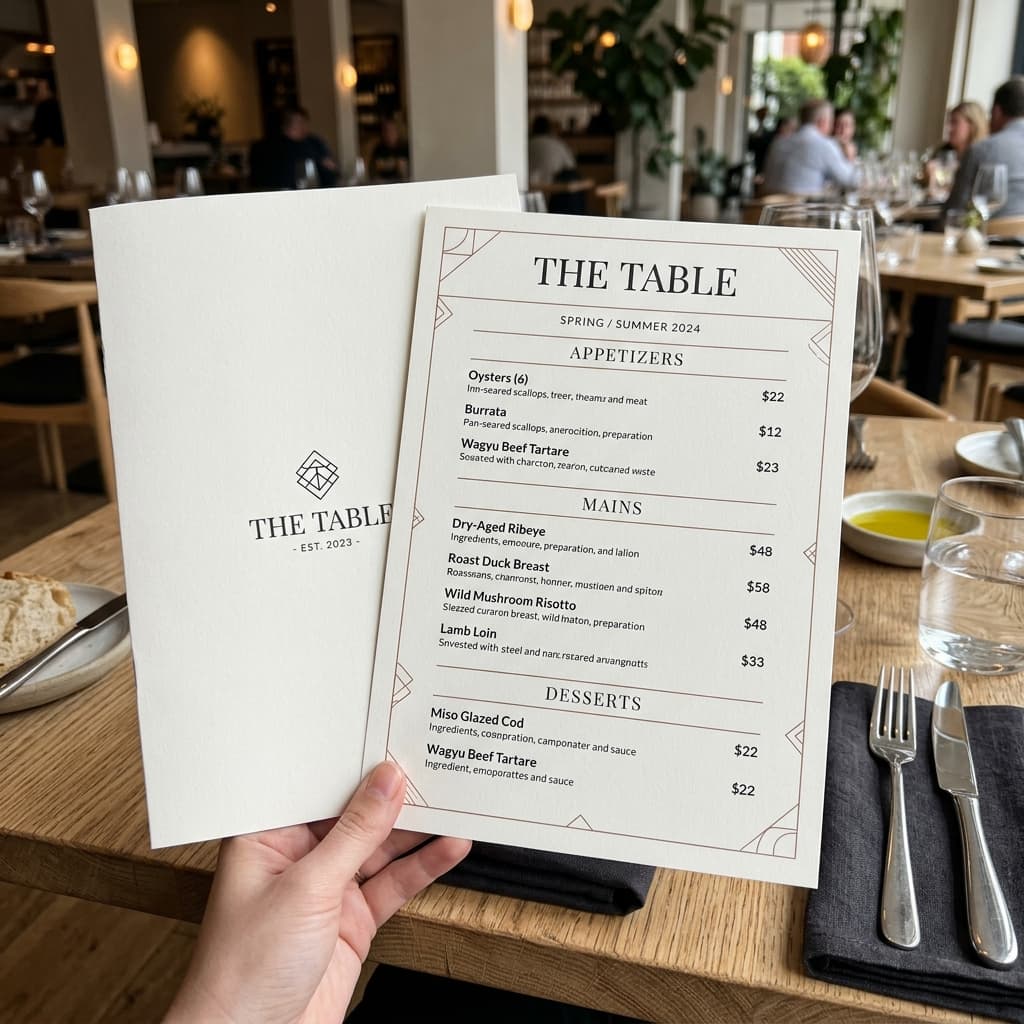
Create a professional, visually appealing restaurant menu design using the information and assets provided by the user.
1. Customization Parameters
[restaurant_name]
[tagline]
[menu_style]
[menu_categories]
[contact_info]
[address]
2. Compiled Prompt Preview
Live compiler active
output template
Create a professional, visually appealing restaurant menu design using the information and assets provided by the user.
The user will provide:
1. Restaurant Logo: An uploaded logo image.
2. Restaurant Name: {{restaurant_name}}
3. Menu Items: A list of food/drink items.
4. Categories: Such as Starters, Main Course, Pizza, Burgers, Desserts, Beverages, etc.
5. Prices: Price for every menu item.
6. Optional Item Descriptions: Short descriptions for individual dishes.
7. Optional Restaurant Tagline: {{tagline}}
8. Optional Contact Information: {{contact_info}}
9. Optional Address: {{address}}
10. Optional Theme/Style: {{menu_style}}
---
## Restaurant Branding
Use the uploaded restaurant logo as the primary branding reference.
Preserve the logo exactly as provided.
Do not:
* Redesign the logo
* Change the logo colors
* Distort the logo
* Modify the restaurant name inside the logo
* Add effects that make the logo difficult to recognize
Place the logo prominently but elegantly at the top of the menu.
Use the logo's visual identity to influence the overall menu design, including complementary colors, accents, borders, icons, and typography.
---
## Menu Information
Organize all supplied menu items into their respective categories.
### Categories
Use the provided categories exactly as supplied:
{{menu_categories}}
For each category, display:
### {{category_name}}
Then list each item:
**{{item_name}} — {{price}}**
Optional description:
{{item_description}}
Do not invent menu items, ingredients, descriptions, prices, offers, or categories.
---
## Text Accuracy — CRITICAL
All restaurant information is user-provided and must be reproduced exactly.
Preserve:
* Restaurant name
* Logo
* Category names
* Food item names
* Prices
* Currency symbols
* Descriptions
* Contact details
* Address
* Tagline
Do not:
* Change spelling
* Rewrite names
* Change prices
* Add fake prices
* Invent dishes
* Remove menu items
* Replace currency symbols
* Generate placeholder text
Every menu item and price must be clearly readable.
---
## Menu Layout
Create a polished restaurant-menu layout with strong visual hierarchy.
Recommended structure:
**Restaurant Logo**
**{{restaurant_name}}**
{{tagline}}
---
### {{category_name}}
Food Item 1 ................................ **{{price}}**
Short description
Food Item 2 ................................ **{{price}}**
Short description
Continue until all supplied menu items are included.
Use clear spacing between categories and individual items.
---
## Design Style
The visual style should be determined by:
{{menu_style}}
If no style is provided, automatically create a premium modern restaurant menu.
Possible styles include:
* Modern minimalist
* Luxury fine dining
* Elegant black and gold
* Rustic restaurant
* Vintage café
* Modern café
* Fast-food menu
* Street-food menu
* Indian restaurant
* Italian restaurant
* Asian restaurant
* Bakery
* Dessert shop
* Coffee shop
* Casual family restaurant
* Premium hotel restaurant
---
## Typography
Use professional, highly readable typography.
Use:
* Strong restaurant name typography
* Distinct category headings
* Highly readable food item names
* Clear prices
* Smaller but readable descriptions
Create a clear visual hierarchy:
Restaurant Name → Category → Item Name → Description → Price
Avoid decorative fonts that make food names or prices difficult to read.
---
## Food Photography
If food images are requested, generate or incorporate professional appetizing food photography for the relevant menu items.
Food images should have:
* Realistic textures
* Natural ingredients
* Professional food styling
* Cinematic lighting
* Appropriate plating
* Realistic colors
* Natural shadows
* High-end restaurant photography quality
Do not add food photographs if the user requests a text-focused menu.
If multiple food images are included, maintain a consistent photography style throughout the menu.
---
## Color System
Build the color palette around the uploaded restaurant logo.
Use complementary colors while maintaining excellent readability.
Maintain sufficient contrast between:
* Background
* Text
* Prices
* Category headings
* Decorative elements
Do not use colors that conflict with the restaurant's branding.
---
## Visual Hierarchy
Make the menu immediately scannable.
Category headings should be visually prominent.
Food names should be easy to find.
Prices should be clearly visible and consistently aligned.
Descriptions should be secondary to the item name and price.
Avoid excessive decorative elements that compete with the menu content.
---
## Decorative Elements
Use subtle restaurant-appropriate decorative elements such as:
* Elegant lines
* Minimal icons
* Food illustrations
* Subtle patterns
* Fine borders
* Small botanical elements
* Tasteful geometric accents
* Light textures
Decorations should support the restaurant's identity rather than overwhelm the menu.
---
## Multiple Pages
If the supplied menu contains too many items to fit comfortably on one page:
Automatically create a multi-page menu.
Maintain consistent:
* Logo placement
* Typography
* Colors
* Category styling
* Item formatting
* Price formatting
* Decorative language
Do not reduce the font size excessively just to force everything onto one page.
Each page should remain clean and highly readable.
---
## Menu Formats
The design should work well for:
* Printed restaurant menus
* Digital menus
* QR-code menus
* Instagram posts
* Restaurant websites
* Food delivery displays
* Table menus
* Takeaway menus
If the user specifies a format or aspect ratio, optimize the composition accordingly.
---
## Professional Food Branding
The final design should feel like it was created by a professional restaurant branding and graphic-design agency.
It should communicate the restaurant's personality while making the food selection easy to browse.
The final result should be:
Professional • Elegant • Readable • Brand-consistent • Appetizing • Modern • Commercially usable
---
## Strict Constraints
Do not:
* Change the uploaded logo
* Invent menu items
* Invent prices
* Change prices
* Remove supplied items
* Change category names
* Add random text
* Generate gibberish
* Use fake currency symbols
* Duplicate menu items
* Hide prices
* Overlap text
* Use unreadable typography
* Distort the logo
* Add watermarks
* Add unrelated branding
* Create excessive visual clutter
1Customize Variables
Fill in the parameters on the left. Type custom topic, instructions, or adjust selectors to fit your exact business goals.
2Live Compiler Updates
The template values will be automatically inserted into the placeholders in real time on the right preview window.
3Copy & Paste to AI
Click the large action button to copy the compiled prompt, then paste it directly into Midjourney to experience top outcomes.
An ethereal, ultra-realistic portrait of a woman in a hijab gently holding a delicate pale pink rose over one eye, surrounded by blooming garden foliage.
A beautiful double-exposure composite featuring a large portrait and a smaller full-body figure set against a watercolor and doodle scrapbook background.